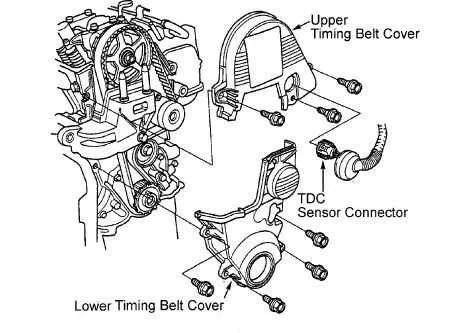
Check your 2005 Honda Civic serpentine belt alignment using the factory diagram before attempting removal. The belt drives the alternator, power steering pump, and air conditioning compressor, so correct routing prevents mechanical failure.
Locate the tensioner pulley on the front of the engine and use a 3/8-inch ratchet to release tension. Always note the belt path in reference to the crankshaft, alternator, and A/C pulleys to ensure precise reinstallation.
Inspect the belt for cracks, fraying, or glazing while it is removed. Replace any worn belt immediately with a matching OEM part to maintain consistent performance and avoid engine damage. Apply a light coating of belt dressing only if slipping is observed, avoiding excess that can contaminate pulleys.
Confirm the routing matches the diagram exactly before starting the engine. Run the engine briefly and observe belt movement, ensuring smooth operation without noise or misalignment. Proper installation reduces wear and extends component lifespan.
2005 Honda Civic Belt Diagram Detailed Guide for Proper Installation and Maintenance
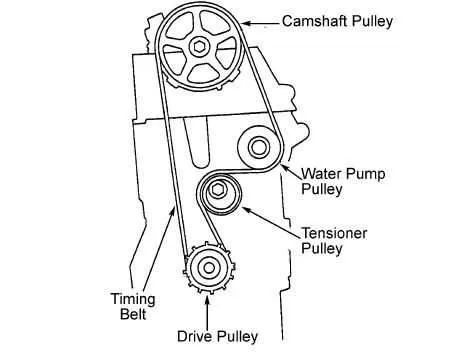
Follow the belt routing diagram carefully to ensure the serpentine belt aligns with all pulleys correctly. Misalignment can cause premature wear or damage to the belt and accessories.
Before removing the old belt, release tension using the tensioner pulley. Rotate the tensioner clockwise with a wrench to free the belt, then slide it off each pulley. Keep note of the belt path or take a photo for reference.
Inspect all pulleys, tensioners, and the belt itself. Look for cracks, fraying, glazing, or worn teeth on the belt. Check the tensioner for smooth movement and proper spring pressure.
- Locate the crankshaft pulley at the bottom center; it drives the belt through all accessory pulleys.
- Route the belt around the alternator pulley, ensuring it sits in the grooves.
- Wrap the belt around the power steering pump pulley and the air conditioning compressor pulley, following the exact path in the diagram.
- Engage the tensioner pulley last, applying force to slide the belt over it.
After installation, rotate the crankshaft pulley manually two full turns to settle the belt and confirm proper alignment on all pulleys. Listen for unusual noises and check that the belt sits fully in each groove.
Regularly inspect the belt every 12,000 miles or 12 months. Replace it if any signs of wear appear. Maintaining the correct tension and alignment extends the life of the belt and connected accessories.
- Do not twist or flip the belt during installation; maintain the original orientation.
- Ensure the tensioner moves smoothly and returns to position without sticking.
- Keep the belt free of oil, coolant, or debris to prevent slippage.
- Check pulley alignment with a straight edge or ruler to prevent uneven wear.
Identifying All Pulleys and Belt Paths on a 2005 Honda Civic
Locate the crankshaft pulley at the lower center of the engine; it drives the serpentine belt and sets the rotation for all accessory pulleys.
The alternator pulley sits on the upper left, slightly angled toward the radiator, and maintains electrical charging while spinning in sync with the crankshaft.
Position the power steering pump pulley on the upper right; confirm alignment with the tensioner to prevent belt slipping and ensure smooth steering assist.
The air conditioning compressor pulley is near the lower right corner; check the ribbed side of the belt against the grooves of this pulley for proper contact.
Locate the idler pulley between the crankshaft and alternator pulleys; it guides the belt, maintaining proper routing and tension without connecting to any accessory.
The automatic belt tensioner is mounted near the center, slightly below the alternator; use a wrench on its square hole to relieve tension when removing or installing the belt.
Follow the belt path: from the crankshaft, it runs around the tensioner, over the idler pulley, loops the alternator, dips around the power steering pulley, passes the A/C compressor, and returns to the crankshaft. Confirm rib alignment on all grooved pulleys.
Double-check that the belt sits fully in each pulley groove, with no slack or twisting. Misalignment causes squealing, premature wear, and reduced accessory performance.
Step-by-Step Procedure for Replacing the Serpentine Belt on a 2005 Honda Civic
Start by locating the belt routing diagram under the hood or in the owner’s manual. Confirm the path for the serpentine belt around the alternator, power steering pump, crankshaft, and A/C compressor to avoid installation errors.
Loosen the tensioner pulley using a 3/8-inch ratchet or breaker bar. Rotate the tensioner clockwise to release tension on the old belt and carefully slide it off the pulleys.
Inspect all pulleys and the tensioner for wear, cracks, or misalignment. Replace any damaged components to prevent premature belt failure and ensure smooth operation.
Compare the new belt with the old one to confirm the correct length and rib alignment. Check that the ribs match the grooves on the pulleys for proper grip.
Route the new belt following the diagram precisely. Begin with the crankshaft pulley and continue around the remaining pulleys, leaving the tensioner for last. Ensure each rib sits fully in the pulley grooves without twisting.
Apply tension using the tensioner pulley. Rotate the tensioner again to slide the belt into place fully. Slowly release the tensioner, allowing it to press against the belt and maintain proper tension.
Double-check the belt alignment on all pulleys. Misalignment can cause squealing or premature wear. Adjust if necessary to ensure smooth operation.
Start the engine and observe the belt in motion. Listen for unusual noises and watch for any slipping. Stop the engine and recheck the belt tension if needed.
Perform a final inspection of all pulleys and the belt path. Confirm there are no loose or misaligned sections before completing the procedure.
Common Issues and Troubleshooting Belt Alignment and Tension
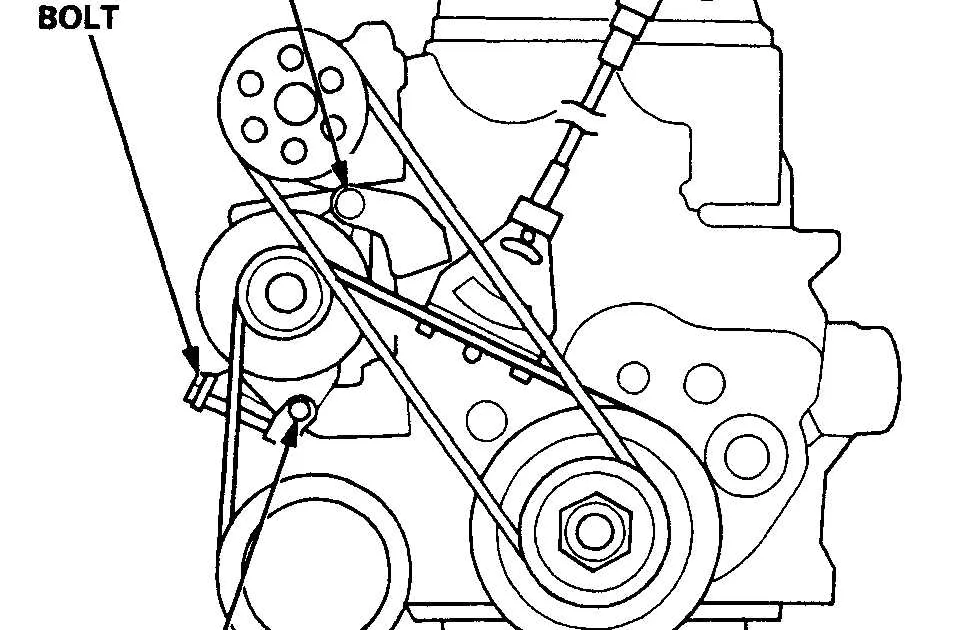
Check the serpentine belt for visible wear, such as cracks, fraying, or glazing. Uneven wear often indicates misalignment of pulleys or incorrect tension. Use a straightedge or ruler along the pulley faces to verify alignment; even a slight deviation can cause belt slippage and noise.
Inspect the belt tensioner for proper operation. A weak or stuck tensioner can lead to excessive slack or tightness. Release the tensioner using the appropriate socket or wrench and observe its movement; it should move smoothly and return to its resting position without hesitation.
Examine each pulley for wobbling, rust, or buildup. Misaligned pulleys, worn bearings, or debris can push the belt off track. Rotate the pulleys by hand to feel for rough spots or resistance. Replace any pulley that does not spin freely or shows lateral movement.
Verify the routing of the belt against the official 2005 Honda Civic belt diagram. Incorrect routing can overload specific components and create abnormal tension points. Follow the diagram step by step, starting at the crankshaft pulley and looping around idler and accessory pulleys in sequence.
Listen for squealing or chirping noises while the engine is running. Persistent noise may indicate tension too loose or a contaminated belt surface. Apply a small amount of belt dressing sparingly only if recommended by the manufacturer, and avoid over-lubricating pulleys.
After any adjustment, run the engine for several minutes and recheck the belt alignment and tension. A properly aligned belt should track squarely across all pulleys and maintain consistent tension without manual intervention. Repeat inspections every 5,000 miles or after replacing a belt or tensioner.